SCCM
This blog post is a complete revised Step-by-step SCCM Installation Guide. It covers every aspect of the SCCM Installation. From the server prerequisites to the SQL installation, the Sccm installation itself and all configuration and site server installation. Following this guide, you should have a functional SCCM server in a couple of hours.
We already did a guide in the past when SCCM 1511 was released but it’s was time for a 2020 refresh.
Since our first guide, more than 12 SCCM version has been released… and the product even changed its name to Microsoft Endpoint Manager. (MEM or MEMCM).
SCCM installation has never been an easy process and the product itself can be complex for inexperienced administrators. With this blog post, our goal is to bring it a bit further, explaining concepts and best practices rather than just guide the user through the installation process.
If you’re not familiar with SCCM Current Branch Features, you can visit this Microsoft Docs article which covers it all.
If you’re still running SCCM 2012 (!) and plans to migrate, stop reading this guide. You do not need to do a complete new installation. See our blog post on how to upgrade to SCCM Current Branch instead.
We hope this guide brings all the information you need and that you’ll appreciate administering it.
PART 1 – DESIGN RECOMMENDATION AND INSTALLATION PREREQUISITES
SCCM HARDWARE REQUIREMENTS
In the first part, we will cover SCCM installation prerequisites most specifically hardware requirements, design recommendations, and server prerequisites.
The hardware requirements for a Primary Site server largely depends on the features that are enabled, and how each of the components is utilized. When the number of clients grows and changes, the server hardware requirements change accordingly. For the initial deployment, hardware requirements can be estimated for each server by determining:
The overall need for each component (Will you do Operating System Deployment ? How many daily software deployments ? Is Inventory and reporting is important for your organization? Will you manage Internet Client ?)The number of clients planned to be installedThe load on each of the installed SCCM components
In general, medium environments (couple thousand clients) should consider the following recommendations when planning hardware:
SCCM and SQL Server communicate constantly. We recommend that the main database and SQL Server be installed on the Primary site server. This is fully debatable and we understand that some organization tries to standardize their SQL distribution. Performance is simply better using a local installation when configured properlyNeither the SCCM site nor the SQL database should share their disks with other applicationsConfigure the SQL Server databases and logs to run on a different disk than the disk where the SCCM database is located.
Another issue to consider when determining hardware requirements for a site servers is the total amount of data that will be stored in the database. To estimate the required database size for a single site, an approximate figure of 5Mb to 10Mb per client is typically used.
In our setup, we will install a single Primary Site that has the role of Management Point, Reporting Point, Distribution Point, PXE Service Point, State Migration Point, Fallback Status Point and Software Update Point. SQL Reporting Services will be used to provide consolidated reporting for the hierarchy. This role will also be installed on the SCCM Server. Running reports can have an impact on server CPU and memory utilization, particularly if large poorly structured queries are executed as part of the report generation.
Consider placing client-facing role (Distribution Point, Reporting Point) on a separate server in order to reduce load on your Primary server.
Here’s our recommended reading about hardware requirements:
SCCM INSTALLATION GUIDE
Design a hierarchy of sitesRecommended hardwareSupported configurationsPlan for the site databasePlan for site system servers and site system roles
We strongly recommend that you understand SQL Server before installing SCCM. Talk and have a good relation with your DBA if you have one in your organization.
Here’s our recommended reading about SQL :
Storage Top 10 Best PracticeSQL Server Best Practices ArticleDisk Partition Alignment Best Practices for SQL Server
OPERATING SYSTEM
For this post, our servers run Windows 2019 with latest security patches
Make sure that your OS is supported, see the SCCM Current Branch Technet Documentation
DISKS
Disks IOs are the most important aspect of SCCM performance. We recommend configuring the disks following SQL Best practice. Split the load on a different drives. When formatting SQL drives, the cluster size (block size) in NTFS must be 64KB instead of the default 4K. See the previously recommended reading to achieve this.
PRIMARY SITE SERVER PREREQUISITES
Once your hardware is carefully planned, we can now prepare our environment and server before SCCM Installation.
ACTIVE DIRECTORY SCHEMA EXTENSION
You need to extend the Active Directory Schema only if you didn’t have a previous installation of SCCM in your domain. If you have SCCM 2007 already installed and planing a migration, skip this step.
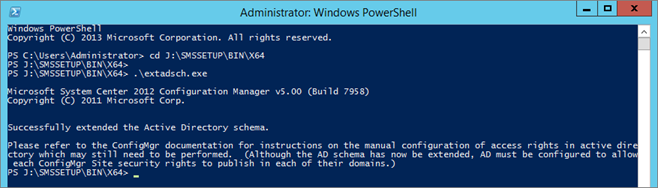
Logon to a server with an account that is a member ofSchema Adminssecurity groupFrom SCCM ISO run.\SMSSETUP\BIN\X64\extadsch.exe
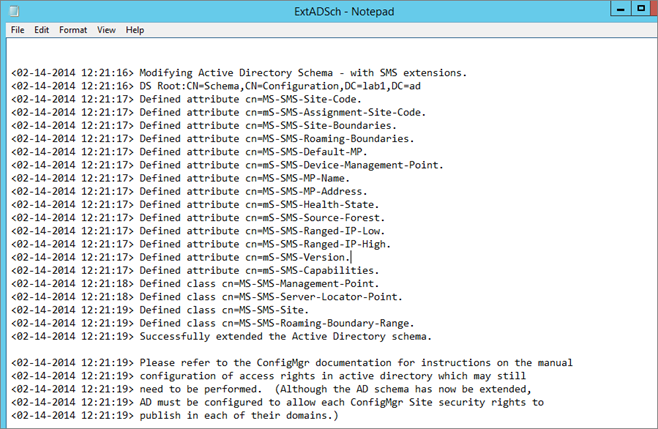
Check schema extension result, openExtadsch.loglocated in the root of the system drive